
A couple of weeks ago, I started coding up a serialization system for a side project I’m working on. After thinking about the problem and jotting my ideas down on paper, I walked some developer friends of mine through the design. When I mentioned wanting to use Unit Tests, one of my friends (we’ll call him Sam) said, “Ugh. Why though?”
Now Sam is a smart guy and a great developer. So when he asked me that question, it caught me off guard. Aren’t Unit Tests good? Well, not always. At his current job, they Unit Test EVERYTHING and the managers are pushing for 100% code coverage. Development speed has slowed to a crawl and changing anything winds up breaking several tests that don’t matter. I admitted that sounded terrible. I promised that I was going to do things differently and I’d report back on how things went.
How I used Unit Testing
At first I just used the Unit Test harness as an easy spot to run some one-off code. I wanted to write some of the data to disk so it was easy as marking a method with the Test attribute. Then I could double click the test any time I wanted to execute it. This throw away code quickly turned into my actual SaveFile and LoadFile tests.
Over the next couple of weeks, I got the following things working. Next up were tests for saving basic classes and structs. That felt a bit like busy work, but it wound up being useful as the tests served as templates for other tests. And when I accidentally broke my UniqueObject system, these tests let me know about it. Then SaveTeam/LoadTeam proved out that I could save object hierarchies. SaveTestStateMachine/LoadTestStateMachine showed that I could serialize big inheritance chains with OnComplete delegates and Message Subscriptions.
So Did Unit Testing Help?
Absolutely. My side project is already well under way. Implementing the Save System directly in the existing code with the real data would have added complexity to an already complex problem. Having separate test classes and methods meant I didn’t have to worry about breaking existing functionality while I got the basics of the system working.
It was also very useful whenever I changed how things should work. I had a general idea of where I wanted to go with the Save System, but I changed my mind on design specifcs quite a few times along the way. After a big refactor, I would run my tests. Many times it was all green check marks, but sometimes there’d be a red X showing me where I broke something. Getting the status board back to all green made it so I was confident in my changes.
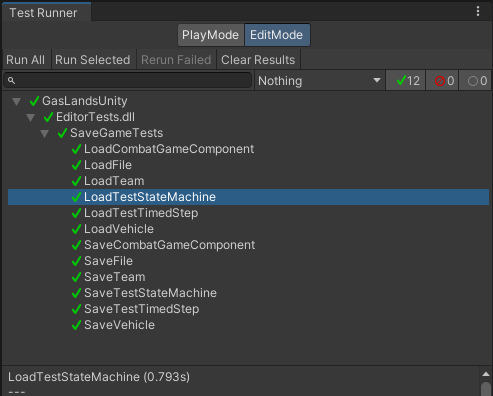
It even helped me find a couple of tricksie bugs when I was loading a more complex object and the OnCompletes were all getting called twice. Originally, I thought the bug was going to be inside my delegate serialization system. But the individual tests were working fine. Digging a little deeper, it turns out that I was still saving out the OnComplete calls in a derived class and forgot to delete it when I moved this logic up to the base class. This let me focus my debugging efforts on the correct spot instead of wasting time looking at working code.
Now I have a solid system in place and I can wire it up inside my actual project. I’m sure I’ll encounter problems along the way and run into things I haven’t thought of. And when I change the design to accommodate these issues, I’ll have my tests to keep me pointed in the right direction.
When should you write a Unit Test?
- When you want to have some easily executable throwaway code. – I’ve written plenty of Debug methods and slapped them into main or some other random part of the process that gets triggered. I’ve also accidentally left code like that in and seen log messages with “EckTest – Inside SaveFile()” inside released code. >.<
- When you want a separate environment to work in. – Starting from a clean slate reduces complexity and makes sure you don’t break things while you develop a new system.
- When your design isn’t solid, but what you want to accomplish is. – In my case, serialzing something and deserializing it is a known quantity. I want the loaded object to have the correct data. This is also true when writing big refactors for a system that is already working.
- When it speeds up your development process. – Unit testing is a tool like any other. If it’s speeding up your time to delivery… Use it!
When shouldn’t you Unit Test?
- Unit testing for unit testing’s sake. – Don’t do this (or anything else really) “just cause”. Have a good reason.
- When what you want to accomplish is unknown. – If every time you change your mind you have to change the test too… That’s probably a bad thing to be unit testing. If you aren’t sure what you want to happen, you aren’t ready to write a unit test for that thing yet. Come back later when you do.
- When it slows down your development process. – Unit testing is a tool like any other. If it’s slowing down your time to delivery… DON’T use it! It’s worth mentioning that writing Unit Tests does take time. But it’s an investment. You need to weigh the time it will cost against how much time you might save. Odds are, probably yes.
Tips from your Uncle Eck
- Test the concepts – not the facts. – Test that the damage system works. Don’t write a test that your Autocannon does 5 damage. Designers will change their mind and break a whole suite of tests.
- Test WHAT your code should do, not HOW it does it. – How something works might change several times over the project. It isn’t worth testing unless the “how” is an actual requirement.
- Use a human readable format during dev. – It saves sooo much time. I can read my save files, and all my UniqueObjectIDs. If this was a binary file with guid IDs, I’d have to jump through a ton of hoops to be able to untangle problems. And if you need a binary format at the end of the project, you should be able to swap things out without too much trouble.
- All absolute statements are flawed (except maybe this one). – If someone tells you to ALWAYS use Unit Tests or to NEVER use Unit Tests, they’re probably wrong. Use them when they’re the right tool for the job.



 EckTech Games